


🔗 Website URL
🎨 Customize QR Code
📄 PDF Document
🔗 Multiple URLs
👤 Contact Information
📝 Plain Text
📱 Mobile App
💬 SMS Message
📞 Phone Number
🔍 QR Code Preview
📱 Enter data to generate QR code
QR code will appear here
✅ High Quality PNG
✅ 300x300 pixels
✅ Custom Colors & Logo
✅ Ready to use
QR Code Generator Online
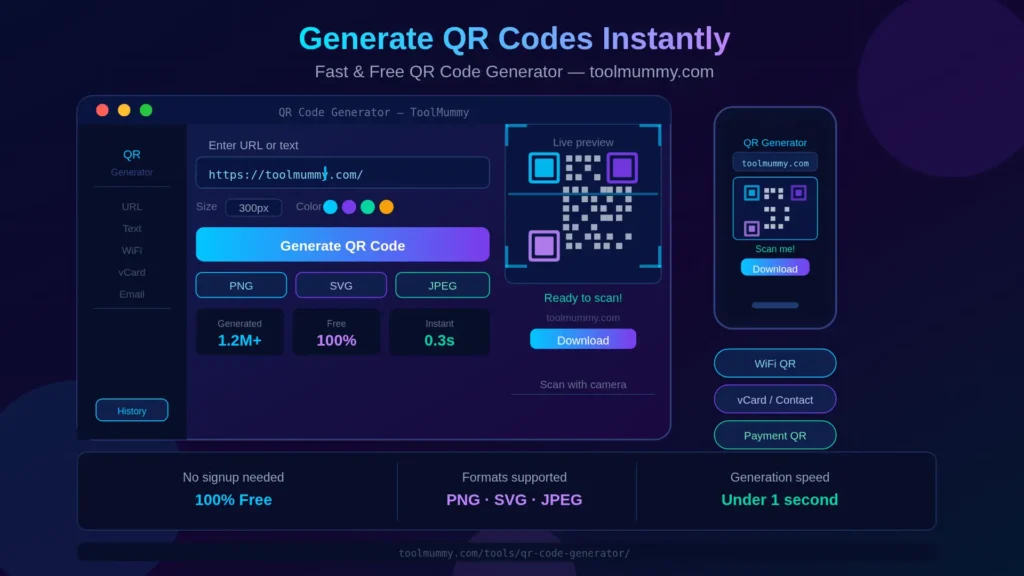
Need to share a link, contact details, WiFi password, or any information — without asking people to type it out? Our free online QR code generator creates scannable QR codes for any type of data in seconds. Enter your URL, text, phone number, email, or WiFi credentials — and your QR code is generated instantly, ready to download and use anywhere. Print it on a business card, paste it on a menu, add it to a presentation, or share it digitally — anyone with a smartphone can scan it and reach your content immediately. No software to install. No account. No watermark.
No downloads. No signup. No ads. Just enter your content and get your QR code instantly — ready to download and use.
How to Use This QR Code Generator
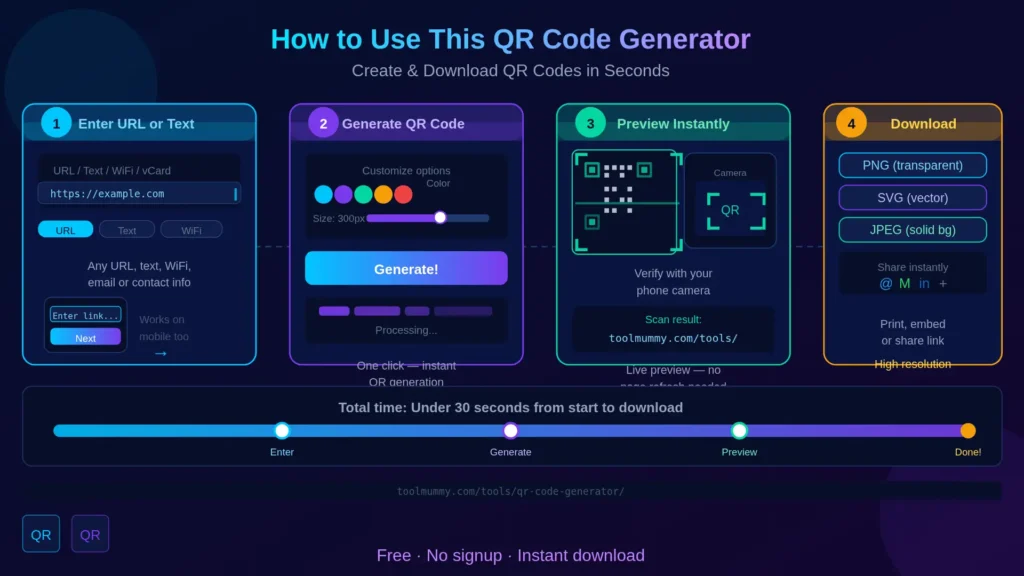
Creating your QR code takes under 30 seconds. Here is how it works:
Step 1 — Choose Your QR Code Type
Select what type of information you want to encode. Options include URL / Website link, plain text, email address, phone number, SMS, WiFi credentials, vCard contact, and more. Different types produce QR codes optimised for different actions when scanned.
Step 2 — Enter Your Content
Type or paste the content you want to encode. For a URL, paste your website link. For WiFi, enter your network name and password. For a contact, enter the name, phone, and email. The tool accepts all standard input formats.
Step 3 — Customize Your QR Code (Optional)
Change the foreground and background colour of your QR code to match your brand. Add a logo or icon in the centre. Adjust the size for the intended use — small for business cards, larger for posters and banners.
Step 4 — Download and Use
Click Download to save your QR code as PNG (for digital use) or SVG (for printing at any size without quality loss). Your QR code is ready to use immediately — no registration, no watermark, no restrictions.
What types of QR codes you can create:
- URL / Website link — opens any webpage when scanned
- Plain text — displays text directly on the phone screen
- Email — opens an email compose window pre-filled with the address
- Phone number — dials a number automatically when scanned
- SMS — opens a new text message pre-filled with content
- WiFi — connects to a network without typing the password
- vCard / Contact — saves contact details directly to the phone
What Makes This QR Code Generator Different?
Most free QR code generators add a watermark, limit your downloads, or require registration. Ours gives you clean, professional QR codes with no restrictions — completely free.
No Watermark — Clean Professional Output
Every QR code you download is completely clean — no watermarks, no branding from our tool, no logos you did not add yourself. Your QR code looks exactly as professional as you need it to be, whether for a business card or a product package.
Multiple QR Code Types in One Tool
Instead of using separate tools for different QR types, our generator handles everything in one place — URL, text, email, phone, SMS, WiFi, and vCard. Select the type, enter your content, and your QR code is generated immediately.
Customisable Colours and Logo
Change the foreground and background colour to match your brand identity. Add your company logo in the centre of the QR code — making it instantly recognisable even before someone scans it. Branded QR codes get more scans than plain black-and-white ones.
PNG and SVG Download Formats
Download in PNG for digital use on websites, emails, and social media. Download in SVG for print — SVG is a vector format that scales to any size without becoming pixelated, making it ideal for posters, banners, and packaging.
Instant Generation — No Waiting
Your QR code appears the moment you enter your content. No processing time, no page reload, no email delivery. Change the content and the QR code updates in real time — making it easy to preview and perfect before downloading.
Completely Free — No Signup
No account, no credit card, no hidden fees, no daily limits. Generate as many QR codes as you need — completely free.
Who Uses a QR Code Generator?
QR codes are used by over 100 million smartphone users every year — in businesses, events, education, marketing, and everyday personal use.
Business Owners and Retailers
Restaurants use QR codes on tables to replace physical menus — customers scan to view the menu on their phone. Retailers put QR codes on product packaging linking to product demonstrations, user manuals, or review pages. Shop owners display WiFi QR codes so customers can connect without asking for the password.
Marketing and Event Professionals
Marketers put QR codes on flyers, posters, business cards, and magazine ads to drive traffic to landing pages, promotional offers, and campaign URLs — turning print materials into interactive digital experiences. Event organisers use QR codes for digital tickets, entry passes, and feedback forms.
Freelancers and Professionals
Freelancers add QR codes to their business cards that link directly to their portfolio website or LinkedIn profile. Professionals at conferences and networking events share contact details instantly via a vCard QR code — eliminating the need to carry printed business cards.
Teachers and Students
Teachers create QR codes linking to online resources, video lessons, assignment forms, and reading materials — printed on worksheets or displayed on classroom walls. Students use QR codes in project presentations to link to supporting references, videos, and data sources.
Real Estate Agents and Property Sellers
Property listings on boards and newspaper ads include QR codes linking to virtual tours, photo galleries, floor plans, and inquiry forms — giving interested buyers instant access to detailed information from the street.
NGOs, Charities, and Community Groups
NGOs and charities use QR codes on donation posters and community noticeboards linking to payment pages, sign-up forms, and awareness campaigns — making it easier for supporters to take action in the moment they see the material.
QR Code Use Cases — What You Can Create
QR codes can encode far more than just website links. Here is a complete guide to the different types and where each is most commonly used:
| QR Code Type | What It Does When Scanned | Best Use Case |
|---|---|---|
| URL / Website | Opens any webpage in the browser | Marketing campaigns, menus, product pages, portfolios |
| Plain Text | Displays text directly on the screen | Instructions, announcements, event information |
| Opens email app pre-filled with address and subject | Contact forms, customer support, feedback requests | |
| Phone Number | Dials the number automatically | Business cards, shop signage, customer helplines |
| SMS | Opens text message pre-filled with content | SMS marketing opt-ins, quick contact, reminders |
| WiFi | Connects to the network without typing password | Cafes, offices, hotels, events, coworking spaces |
| vCard / Contact | Saves full contact details to phone | Business cards, professional networking events |
Tip: For marketing campaigns where the destination may change, consider using a URL shortener before creating your QR code. This lets you update the destination URL without reprinting the QR code — keeping your printed materials usable even when campaigns change.
How Do QR Codes Work? — Explained Simply
QR stands for Quick Response. A QR code is a two-dimensional barcode — a grid of black and white squares — that stores information in a machine-readable format. When you scan it with a smartphone camera, the pattern is decoded back into its original data.
How Is Information Stored in a QR Code?
A QR code stores data in a matrix of black and white modules (squares). The pattern of filled and empty modules encodes characters using a specific error-correction algorithm. The corners of a QR code contain three square "finder patterns" — the three large squares you always see in the corners — which help the scanner determine the orientation and boundaries of the code.
What Is the Difference Between Static and Dynamic QR Codes?
A static QR code has the data encoded directly into the pattern. Once generated, the data cannot be changed — if you want to update the URL, you need to generate and reprint a new QR code. A dynamic QR code stores a short redirect URL in the pattern. The actual destination can be updated at any time without changing the QR code itself — making it ideal for marketing campaigns and printed materials that need to stay current. Our generator creates static QR codes — perfect for personal, professional, and most business uses.
How Far Away Can a QR Code Be Scanned?
The scanning distance depends on the physical size of the QR code. A business card-sized QR code (about 2cm × 2cm) can typically be scanned from 15 to 30cm away. A poster-sized QR code (20cm × 20cm) can be scanned from 1 to 2 metres. A billboard-sized QR code can be scanned from several metres. As a general rule, the larger the intended scanning distance, the larger the QR code should be printed.
Why Do Some QR Codes Have Logos in the Centre?
QR codes are designed with built-in error correction — they can still be decoded even if up to 30% of the pattern is obscured or damaged. This is why adding a small logo or icon in the centre of a QR code still allows it to scan correctly. The logo uses the error correction capacity while making the code instantly recognisable as belonging to a specific brand. Our generator supports logo addition for exactly this reason.
Frequently asked questions
Everything you need to know about our free online QR code generator.